Custom Formats: Export Any Size You Need
Create your own image or video export sizes — email headers, in-house CMS banners, digital signage — and use them like any built-in format.
The built-in library covers 295+ ad placements, but real work always has that one odd size: an email header, a CMS hero banner, a trade-show screen, a client's homegrown ad server. Custom formats let you define any dimensions once and use them exactly like a built-in format — including crops, overlays, and batch export.
Create a custom format
On the platform selection step, scroll to the Custom Formats section and click Add Custom Size:
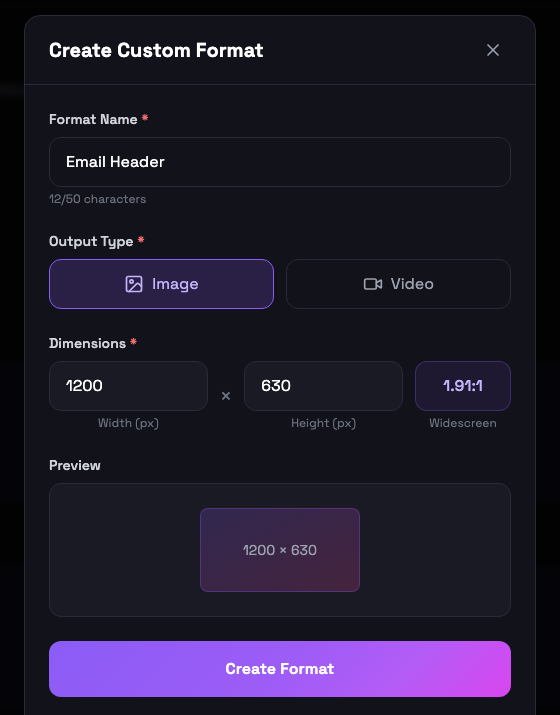
| Field | Rules |
|---|---|
| Format Name | Required, up to 50 characters, unique per account (e.g. "Email Header") |
| Output Type | Image or Video — fixed after creation |
| Dimensions | 50 – 10,000 px per side; the aspect-ratio badge and preview update live |
| Max Duration | Video only: 1 – 600 seconds (default 60) |
Use it anywhere
Once created, a custom format behaves like any built-in one:
- Platform grid — custom formats appear as their own section with type badge and dimensions; hover a card to edit or delete it.
- Format step — compatible custom formats show up in a "Custom Formats" section, filtered to your source type (image formats for image mode, video formats for video mode).
- Preview — custom formats get the same crop, zoom, and overlay treatment as standard formats.
- Export — outputs land in a
Custom Formatsfolder in your ZIP. - Overlay presets — the preset editors list your custom sizes under a "Custom" platform, so you can design overlays at exactly those dimensions.
Editing and deleting
Hover any custom format card in the platform grid: the pencil icon opens the same modal with the values pre-filled (output type stays locked), the trash icon deletes it. If an overlay preset references a deleted custom format, the preset keeps working — it falls back to its stored canvas dimensions and is labeled "Custom format (deleted)" in the library.
Common questions
Custom formats are available on both paid plans (Image Plan and Full Plan) with no limit on how many you create. They are not available on the free trial.
Width and height can each be anywhere from 50 to 10,000 pixels, for both image and video formats. Video custom formats also take a maximum duration between 1 and 600 seconds.
Yes — hover a custom format card and use the pencil icon to edit its name, dimensions, or max duration, or the trash icon to delete it. The output type (image vs. video) is fixed after creation.
In their own "Custom Formats" folder, alongside the per-platform folders, with the same descriptive file naming.
Yes. When you create or duplicate an overlay preset, your custom formats appear as a "Custom" platform in the format picker, so presets can be designed at exactly your custom dimensions.